 The backstory
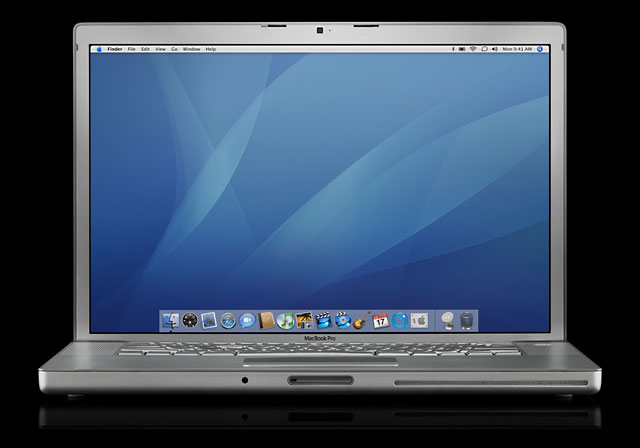
 My former employer graciously bought me a Macbook Pro in 2007. It was a 15" (matte) with a 2.4 Core2Duo Intel processor 2GB RAM and a 200 GB hard drive. Having been a Windows user all of my computing life, I was reluctant to get excited about this. OSX had always been touted as a "dumbed-down" OS that prioritized user ease over depth.
The relevance of these claims has all but evaporated with the revolution of app-based programing. Now, ease of use is the premium upon which all OS's set their sights, and it would seem that both Apple and Microsoft have met somewhere in the middle between ease and full customization.
The machine eventually crashed in 2010 due to a faulty graphics processor. If I'm not mistaken, it is an issue similarly related to the XBOX 360 fiasco which involved integrated NVIDIA chipsets that had been cold soldered to the motherboards ("logic board" in Apple jargon). My suspicion is that, just on the cusp of the huge tech boom, manufacturers were attempting to reduce costs in procedures, and the QA got sloppy. So, defective video chips bred death.
The resurrection
The macbook sat on a shelf until just before I left that job, and I asked if I could take it with me, perhaps as a future project. I tried a couple of internet-suggested fixes that only worked briefly before finally replacing the logic board myself and switching out the RAM and hard drives to grant me more resources. Having left that job to become a grad student, I was still using this same late-2007 Macbook pro for all of my personal computing, and it was performing wonderfully.

I had just recently switched out the DVD drive for another hard drive tray to give me even more space for documents and such, and I had a failing fan that was making a ton of noise. In my mind, the kernel panics were related to one of these two issues: bad hardware or overheating. So I purchased and replaced the fan for an excellent used one on ebay for $10, and I removed the superdrive HDD caddy and put everything back as it should be. However, I could not re-install a clean OS because the kernel issues were forcing reboots in the middle of the install. Bottom line: this serious problem was not caused by heat nor the hard drive caddy. It was something worse, something deeper in the machine.
The decision
I had a decision to make: take the risk and put more money into this now-eight year old machine, or start shopping for the next one. I started my decision-making process by investigating just what was on the market for used macbooks (note to readers: I do not buy computers new). What I discovered were a few dissapointing changes to the Apple approach to computing. Let me just say that I consider the 2006-2008 Macbook Pros the pinnacle of laptop computers. They are designed so extremely well (other than the obvious graphics processor issue) and work so reliably that I can't say anything negative about them. They were the best of their time, following the typical format of offering the best current hardware and design. BUT (a big but) newer Macbooks had changed. Since the launch of Apple's Retina line, all of the most advanced computers used integrated technologies: the RAM is soldered onto the logic board and the hard drives use a proprietary connection, meaning upgrades were intentionally impossible.
Obviously, my 2007 Macbook pro would not have survived as long as it did if I was unable to upgrade the components. And knowing this first hand (and now so well), I realized that there was no way I was going to buy a Retina-based Macbook . . . ever. If I was going to stick with a Mac, it had better be able to last another 8 years.
 Unfortunately for you, dear reader, I immediately decided on an Apple laptop for a couple of reasons. Firstly, I own a well appointed desktop PC for our family computer and home theater (HTPC). I have spent many years configuring a Windows-based machine that can do all that I need it to without failures, and I have it. But, unlike a Mac, one does not simply take a windows-based machine, back it up, and slam it into a laptop. Instead, one must contend with driver compatibilities and a variety of configurations including one of the many software iterations in each generation. (I'm a big fan of Win 7 Pro, btw.)
 My criteria for this next laptop were: a 15" screen, the fastest processor I can afford, and the possibility of hard drive and RAM upgrades. Both 15" screen size and processor speed will make all the difference in price on laptops because they are unable to be upgraded regardless - I accepted this from the outset. What you get is what you get. And, unfortunately for shoppers, Macbooks retain their value very very well over time. The flip side is that differences in price can be only a couple of hundred dollars from one year's model to the next, particularly with little significance in their appointments.
The sad truth about Apple's macbooks
Why? Because screens, processors, and the bus speeds of RAM and chipsets have changed very little over the past several years.
1) Negligible processor changes.
Here's a comparison of 2012 i7 3rd gen intel processors and the latest up-to-date i7 :
 | |
| The Q2 Intel i7 in the mid-2012 Macbook Pro |
 | |
| The Q3 Intel i7 in the 2015 Macbook Pro Retina |
A recent article demonstrates new Macbook Pros are boasting these scores, but what do they mean:
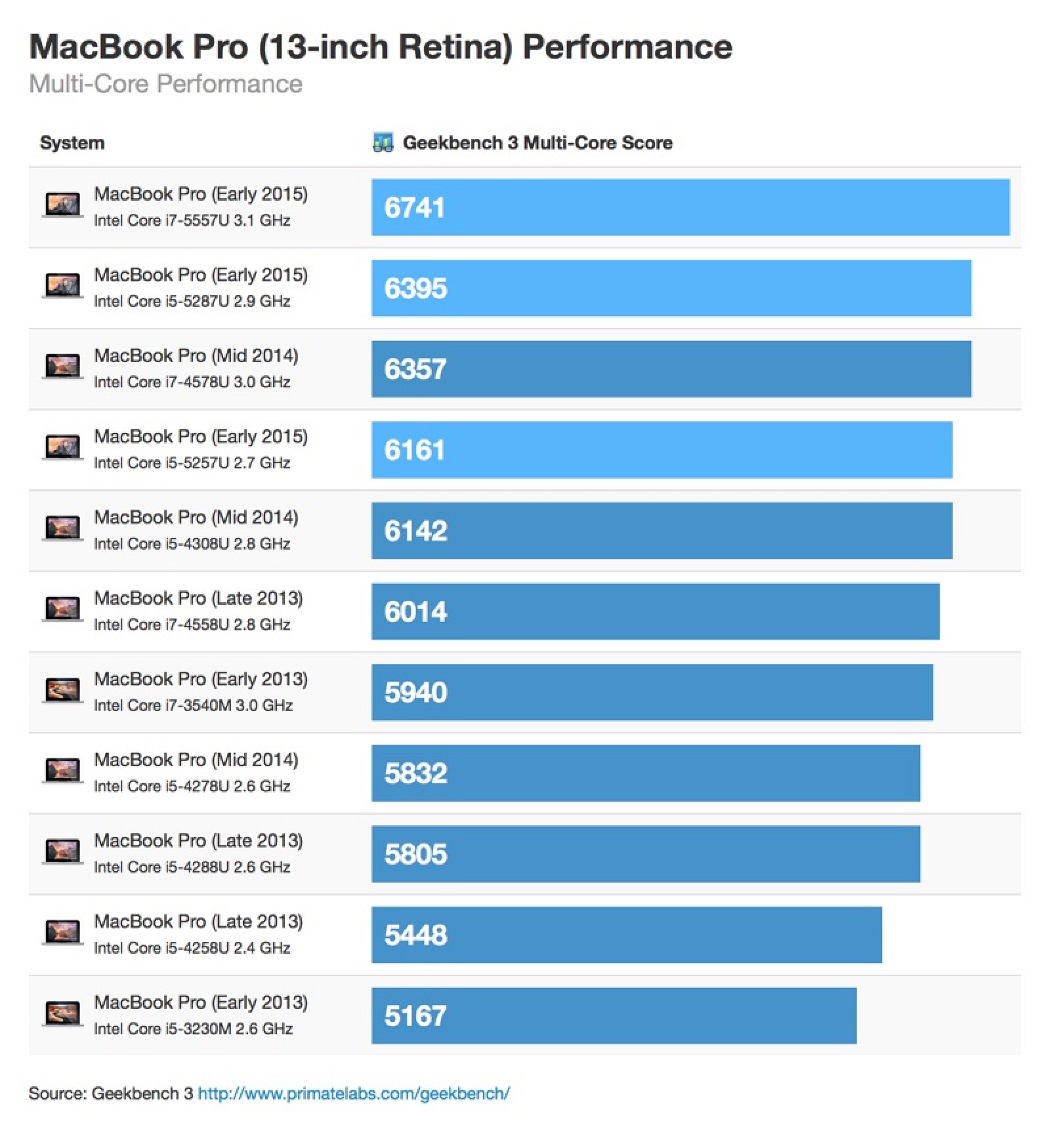
Nevertheless, a thousand points looks really significant from 2013 to 2014. But will it blow your mind when I tell you the mid-2012 non-Retina Macbook pro (the one that can be upgraded) scores in at 13120? That's correct: the 3-year-old model has almost double the geekbench scores posted here for the newest chipsets. To be fair, I found the early-2015 Retina Macbook Pro at 7230 on the site, so I'm not sure where these results are coming from. Nevertheless, the site clearly says, "Higher scores are better, with twice the score meaning twice the performance." And, again, full discolsure, the highest scoring Macbook pro Retina on the list is the mid-2014, 1500s point above the 2012:

2) Either no change in display or downgrades.
MOreover, any Retina-based Mac *since 2012*, the year they were introduced, has the same native screen resolution of 2560X1600 (227 ppi). This is exactly the same for a 2015 13" Retina. Three years of the same thing. On the other hand, if you buy the newer non-Retina Macbook Pro in 2014, your native resolution is a very mediocre 1280X800 - that's right, less than the long-standard 1400X900 which my 2007 Macbook Pro had.
3) The ethical dimensions
Couple this with Apple's three-year-old policy of soldering and bolting all of the components so that it can't be upgraded, it starts to make sense: if the average consumer will keep their machines much longer (like me) if they can upgrade them and keep them running by switching out components. But when all of these features are locked down (actually glued in the case of batteries), one is almost forced to treat their computer like a disposable razor. You heard me right: the new Apple took its marketing tactics from the razor brand Gillette. Really, the advent of the Retina display heralded the new mentality at Apple (the year after Steve Jobs died, as well). All of those changes occurred mid-2012 when there were viable options between two classes of macbook. Retinas and non-retinas. Yet, after 2012, 15" Macbooks without a Retina display all but disappeared. Instead, they became a special-order item that no one wanted because they were, in gamer speak, nerfed.
Consider this article in which the feasibility of the continuation of the non-Retina line leads the author to conclude, "If you can live without the DVD drive and spinning hard disk, shelling out £100 for a machine with a better screen, and a lighter, thinner case, is essentially a no-brainer." Which is true for the consumer who has cash to blow to replace an aging Apple laptop with a new one that fits those criteria. Particularly when what non-Retina Macbook pros can be found are actually handicapped by Apple with inferior components and a 13" screen. (You heard right, there is no 15" Macbook pro non-Retina since 2012.) If you wanted to go out and purchase a 15" Macbook Pro, you're locked into to eventualities: 1) they start at $2000, and 2) they are Retina-only, all components are set from the time of purchase and un-upgradable.
The long game
If these machines are so advanced, and if performance changes are negligible, why would someone who owns a Retina Macbook of any model buy a new one? Perhaps it's because they filled the hard drive and can't replace it? Or perhaps it's because they realized they need more RAM. Ultimately, however, I think the only intelligent reason to buy a newer model Retina is if you change careers and suddenly you can't program or edit video or game like you need to for your career. If these are not your issues, and you've simply run out of necessary resources, I suggest you downgrade . . . Apple expects its customers to need more space because they've marketed their products entirely on speed and performance upgrades (which, reminder, aren't really there). This deliberately neglects the horrible impact of un-replaceable components when there is absolutely no comparable solution that can be upgraded. Apple is saying to customers, "Want to by a laptop you can upgrade? I guess you can have this one, but you're stuck with a smaller screen with worse resolution, and it's an extra $250 to upgrade it to a dual-core i7 with 8GB of RAM, making the cost $2249. The 15" Retina with a quad-core i7 and 16GB is $2000, and the upgraded model with 512GB of SSD space and 16GB RAM is $2500. One is supposed to conclude, like the article above, that you'd have to be stupid to buy the non-Retina.
 |
| mid-2012 MD104LL/A |
The winner
After testing, I discovered the RAM in my 2007 went bad. So I replaced it with a couple of sticks I had handy, and went back to work with it. NOt a hiccup since. Geekbench score: TBD. But the satisfaction of continuing on with the same machine for so many years is a priceless reward. It's also a testament to how sustainability and technology can work together to reduce overall impact. Nevertheless, all of this research got me thinking that Ol' Faithful was eventually going to fail me, and it was best to bite the bullet now, before I was in the middle of writing my dissertation. So after much investigation, I decided that the 2012 Macbook Pro non-Retina 15" was going to be my best price/performance machine. The MD104LL/A is 2012's top of the line model (apart from BTO/CTOs that have an upgraded screen and the 2.7 i7) - this is the 2.6 i7 based laptop with 8GB of DDR3 RAM and a 750GB Hard drive. I recommend it. But only time will tell if it can live up to the quality of it's 2007 predecessor.
